Setting Up My First Home Server
As a tech freak, I am always interested in trying many different hardware, software, or even infrastructure. Some stuff may have use in my day-to-day life and some don’t directly impact that much. But, I just love that!
Like many people who enjoy tech, I have an old laptop. Should I keep it on the side and not make use of it? Hell No!
So I decided that I wanted to build and set up a tiny little server with the specs that are already on the laptop. I did not want to dive so deep and go with prox mox or try to build a super server, just something that can provide me with enough utilities like storage, media streaming, and some docker containers.
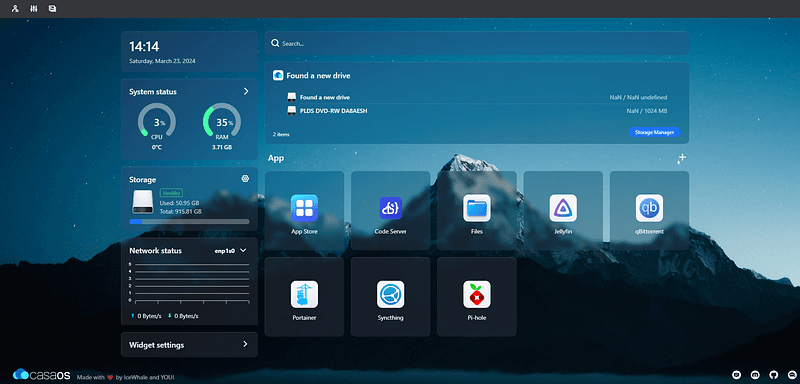
So, I discovered a wonderful cloud operating system called CasaOS
It looked like the exact option that I needed for setting up my tiny server.
Now, I will be telling you about the exact simple steps I went through during the setup:
First: Changing the main operating system from Windows to Linux
For that, any Linux distribution would work. I personally went with LUbuntu to have just the essential and light features as I am not going to be using the OS very much.
Second: Installing CasaOS on top of my main OS
It’s very easy, you just open up any terminal and you do this command as they stated on the CasaOS website:
curl -fsSL https://get.casaos.io | sudo bash
and just like that Casa is installed!
Third: Finding the IP address that I should hit to begin using the system
Most people are having trouble with that. But, it is very easy!
Just open up a terminal and write ip a and you will see the IP that you should use while you are on the same network.
Apps and tools I am using
qBittorrent: For downloading and torrenting files.
Jellyfin: For media streaming. (the best media experience I’ve seen so far)
Portainer: For managing all of my docker containers.
Pi-hole: For network control
I would really like to test this server by hosting some WordPress websites in the future but for now, the best decision I have made was to create this server because it is useful for everything that I am doing from development to entertainment.
Thanks to Tara Rhoseyn for inspiring me to set up the server and write this article for you. She has an article where she documents the exact things she did as well.
As Always! Keep Hustling 🔥🔥